
Without an account
Free
- Product name, EAN and selling price from the page
- Margin calculation with your own commission, VAT and costs
- Save purchase costs per EAN and market
Free Chrome extension
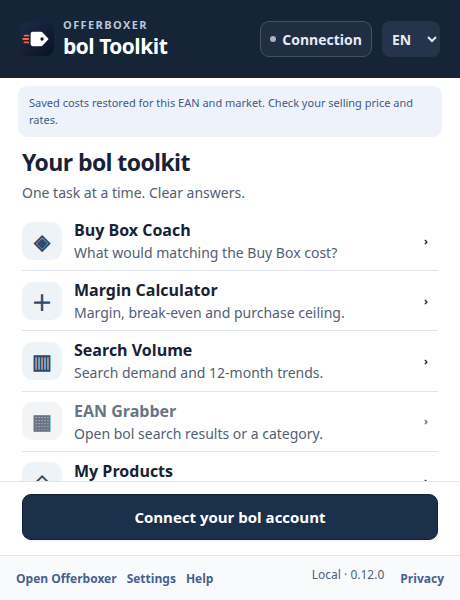
Compare the Buy Box, calculate your margin, explore search volumes and keep a product shortlist. Five tools for bol.com sellers, in one Chrome extension.
Works in Google Chrome on a computer. Free to install. The manual calculation needs no account.
 Margin Check
Example
Margin Check
Example

Buy Box NL€29.956 sellers
Available in Chrome · bol Toolkit
Compare the Buy Box, calculate your margin, explore search volumes and keep a product shortlist. Five tools for bol.com sellers, in one Chrome extension.
Available now through the Chrome Web Store. Already using Offerboxer Margin Check? Keep the same extension: bol Toolkit is its updated interface.
Compare prices, delivery and available seller information with the current Buy Box. Suggestions are estimates, not a promise to win.
Enter your purchase cost. Check profit, maximum purchase cost at break-even or your target margin, and an indicative break-even selling price. Connected commission quotes apply to each exact price.
Explore 12 months of bol search volumes for NL or BE and related terms through your own connected account. Search counts are not sales estimates.
Select products from the search or category cards already loaded in your browser. Save or copy available EANs. A product without an EAN stays unresolved until you open its page.
Keep a local shortlist with saved costs per EAN and market. Refresh recent saved products to compare current observations with their saved values.
Free installation and manual calculation need no account. Official commission, Coach market data and Search Volume require an Offerboxer account, a working bol integration and the appropriate plan access. VAT starts at an editable 21%; logistics at €0 unless you saved other values. Review these assumptions.
Chrome normally installs Store updates automatically. If Chrome disables the extension after the bol-page permission change, review the new access request before enabling it. Reload open bol pages after updating. Open Connection to pair your own Offerboxer account; logging into bol alone does not connect it.
Private monitoring and cloud cost sharing are not currently available. Your shortlist and purchase costs stay on your device. Connecting your Offerboxer account enables the read-only market tools; it does not start monitoring.
Free or connected
Free
Included in your subscription
Requires a subscription with a connected bol account and market insights.
How it works
Install Margin Check for free from the Chrome Web Store and pin the icon to your toolbar.
Click the icon on a bol.com product page. The extension reads the name, EAN and price.
You see your margin straight away. Choose "Connect through Offerboxer" once for automatic commission and competitors.
Privacy
Purchase costs and your shortlist stay on your device. Private monitoring and cloud cost sharing are currently unavailable. Bol API keys stay on the server. The optional bol-page strip reads the loaded product page without background crawling or automatic page-view reporting.
Privacy notice of the extensionFrequently asked questions
Yes. Installing it and the manual margin calculation are free, without an account. For the automatic bol commission, competitors and Buy Box you connect an Offerboxer account.
Not for the manual calculation. You do for data that comes straight from bol: the official commission at your selling price and the competing offers. Offerboxer fetches those with your own bol connection.
No. Chrome extensions only work in Google Chrome on a computer (Windows, Mac, Linux or ChromeOS).
Purchase costs and your shortlist stay on your device. Private monitoring and cloud cost sharing are currently unavailable. Bol API keys stay on the server. The optional bol-page strip reads the loaded product page without background crawling or automatic page-view reporting.
No. Margin Check is made by Offerboxer, an independent platform. It is not affiliated with or endorsed by bol.com.
No. It is the updated interface of Offerboxer Margin Check, available through the same Chrome Web Store item. Keep your existing installation.
Free in the Chrome Web Store. Want your prices to move automatically within your limits as well? Try Offerboxer.
Leave a message. We’ll also reply by email.
Enter your details to start a conversation with our team.